How Google Workspace Streamlines Your Workflow
Seamlessly
Integrated Tools
All your favourite apps work together, from email to video calls to chats, creating a smooth uninterrupted workflow for your entire team.
Real-Time
Collaboration
Work together effortlessly in real-time on documents, spreadsheets, and presentations. Google Workspace keeps your team connected and aligned.
Admin Control &
Data Security
Manage users and data with powerful administrative tools, ensuring your company’s information is secure and compliant with your policies.
Trusted by Companies
Integrated Productivity Suite
Gmail with Custom Domain
Get professional email that uses your company’s domain with smart features to manage your inbox efficiently and connect with clients.
Google Drive Cloud Storage
Store, organize, and share all your company files securely in the cloud, ensuring easy access and collaboration from anywhere.
Google Meet for Video Conferencing
Connect face-to-face with high-quality video meetings. Easily host or join calls from any device, keeping your team connected.
Google Calendar for Team Scheduling
Easily schedule meetings, manage appointments, and share availability with your team, keeping everyone synchronized and organized.
Google Chat for Team Messaging
Connect instantly with your team through secure messaging. Share files, create group conversations, and keep communication flowing seamlessly.
Gemini in Workspace Apps
Leverage AI power directly within your Workspace apps. Get smart assistance for writing, summarizing, and brainstorming, making your work even more efficient.
Gmail with Custom Domain
Get professional email that uses your company’s domain with smart features to manage your inbox efficiently and connect with clients.
Google Drive Cloud Storage
Store, organize, and share all your company files securely in the cloud, ensuring easy access and collaboration from anywhere.
Google Meet for Video Conferencing
Connect face-to-face with high-quality video meetings. Easily host or join calls from any device, keeping your team connected.
Google Calendar for Team Scheduling
Easily schedule meetings, manage appointments, and share availability with your team, keeping everyone synchronized and organized.
Google Chat for Team Messaging
Connect instantly with your team through secure messaging. Share files, create group conversations, and keep communication flowing seamlessly.
Gemini in Workspace Apps
Leverage AI power directly within your Workspace apps. Get smart assistance for writing, summarizing, and brainstorming, making your work even more efficient.
Achieve More with Cyber Edge
Curated Digital Marketplace
Curated
Digital Marketplace
Cut through the noise with only the best handpicked solutions. We carefully select and bring you dependable software from diverse categories, saving you valuable time and effort from navigating a multitude of options.
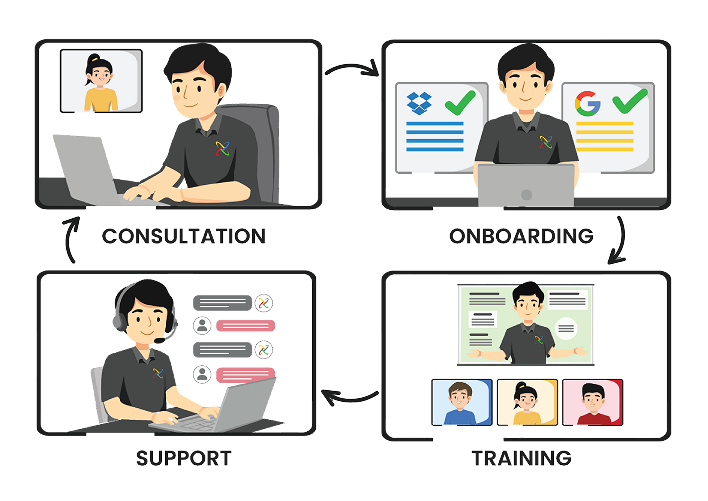
Comprehensive COTS Framework
Comprehensive
COTS Framework
From first call to full rollout, our COTS framework is your complete guide to success. This 4-step approach includes specialized Consultation to start right, seamless Onboarding for quick setup, practical Training for your team, and dedicated Support whenever you have questions.
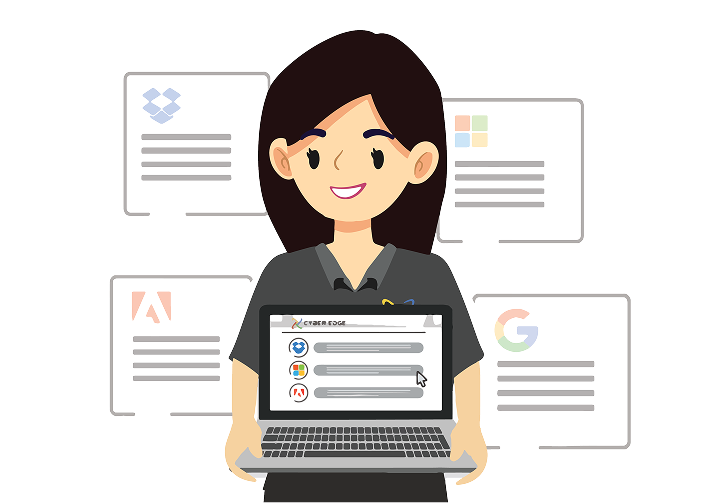
Centralized Subscription Management
Centralized
Subscription Management
Take control of all your software subscriptions from one central dashboard. Manage all your licenses, renewals, and billing in a single platform, giving you clear oversight and saving you administrative hassle.
Cumulative Rewards Program
Cumulative
Rewards Program
As you grow with Cyber Edge, your rewards grow too! Our rewards program allows you to accumulate benefits and exclusive perks over time, ensuring you get increasing value and recognition for choosing us.
What Our Clients Say
Frequently Asked Questions
What's the key difference between Google Workspace and a free Gmail account?
While a free Gmail account is great for personal use, Google Workspace is built for business. It gives you a custom email address using your company’s domain (e.g., yourname@yourcompany.com) instead of the standard @gmail.com. It also provides more cloud storage, enhanced security features, and powerful administrative tools to manage users and data.
What security features are included in Google Workspace?
Google Workspace has strong built-in security to protect your business data. This includes advanced spam and phishing detection, multi-factor authentication (MFA) to prevent unauthorized logins, and data loss prevention (DLP) to stop sensitive information from being shared externally. Data is also encrypted both when in transit and when at rest on Google’s servers.
How does Google Workspace improve team collaboration?
Google Workspace is designed to help your team work better together. Multiple team members can work on the same document, spreadsheet, or presentation at the same time, seeing edits as they happen. With tools like Google Meet and Google Chat, your team can easily communicate, share files, and hold meetings from anywhere, on any device.
Can I migrate my existing emails and files to Google Workspace?
Yes, you can. You can use Google’s migration tools to import emails, calendars, and contacts from other platforms, including Microsoft Office 365. Our team can also provide you with a professional and affordable migration service to ensure a smooth transition with minimal disruption.
How much storage is included with Google Workspace plans?
Storage varies by plan and is pooled across your organization. Business Starter plans begin with 30GB of pooled storage per user, while Business Standard offers 2TB per user and Business Plus offers 5TB. You can also choose an Enterprise plan for even more storage.
Is Google Workspace an online-only service?
No, it’s designed to be flexible. While it’s cloud-based and works best with an internet connection, you can enable offline access for mail and files. This means your work doesn’t stop even when connectivity is unavailable.
Can I use Google Workspace on my mobile phone and tablet?
Yes. With a Google Workspace account, you can access your documents, emails, and calendars from any device, including your smartphone and tablet. This allows your team to work securely from anywhere, on any device, increasing productivity and flexibility.
Why should I purchase Google Workspace from Cyber Edge?
While you can purchase directly from Google, working with us gives you dedicated local support and expertise you won’t get otherwise. Our COTS framework—Consultation, Onboarding, Training, and Support—is designed to ensure you not only have the right plan but that your team knows how to use it effectively, maximizing your investment.
Streamline My Workflow With Google Workspace